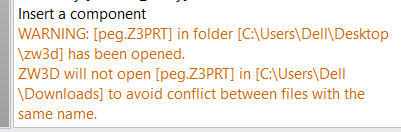
I understand that there can only be one part with a unique name, but I would appreciate if ZW3D offered e.g. automatic renaming (e.g. part_1).
Is it somehow possible? Or how do you solve it?
Thank you!
Seems to me that the renaming process should be entirely in the Users hands. Z3 is doing the right thing. Yeah its pain, but its systemic problem within the users part numbering strategy.
Make sure you rename from ZW, NOT Windows.
Cheers, Paul
If I understand correctly, in this case it is very important to strictly follow part-naming rules in order to avoid duplicate file names. However, in real projects naming processes are not always 100% error-proof and mistakes can occur.
For example, if there are two assemblies containing physically different shafts with the same file name, and both assemblies are later inserted into a main assembly, the first assembly is inserted correctly. When inserting the second assembly, ZW3D may reuse the shaft from the first assembly due to the identical file name, resulting in an incorrect component being used.
In such situations, it would be very helpful if ZW3D could at least report the name conflict or offer an option to rename the second part.
Hi Vojte,
agree its super easy to end up with duplicates.
Ive agonized over this issue for years.
The problem is that either you have to single folder for everything or a structure file system and the risk of duplicates.
The single folder requires some logical structure to part numbering in order to easily group projects or part groups.. I think thats not such a bad idea for humans.
A possible solution is that with the CAD program, when you save a file, the system checks ALL folders under a master folder for an identical file names. This does not exist as an option in ZW at present.
So we are obligated to follow a manual correction process when we come across a conflict.
Have a look at Search Path management in ZW. You can control where the system looks, depth on searches etc, ZW will grab the first file it finds under the search path structure.