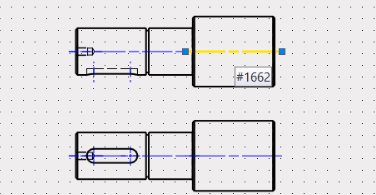
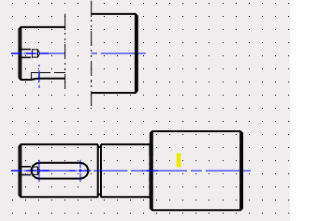
Break projection view in the same size as standard view

Hello everyone,

i have a question about this situation.

  1. You created Standard View and Projection View.
  2. Then you applied Break View to the Standard View.
  3. Is it possible to apply the same break to the Projection View so that it has the same size as the Standard View?

I know that if I first apply the break to the Standard View and then create the Projection View, it works — but that is a different issue.

Many thanks!
Vojtěch

Hello,
Why would you want the “Break to the Projection View” after, when you have the option to do it before?

Hello Manuel,
Sometimes you realize that you don´t have enough space for other extra views (e.g. details) in drawing area and you need to break created views. Or you change dimensions of the structure, so you need to update drawings/dimension of each part. And then you can have the same problem - multiple breaked views and lack of space in drawing area, so you need to shorten them more.

That’s why you use multiple drawings.
If the part is complicated enough to need that many views, it seems reasonable to use bigger paper of more pages.
Cheers, Paul